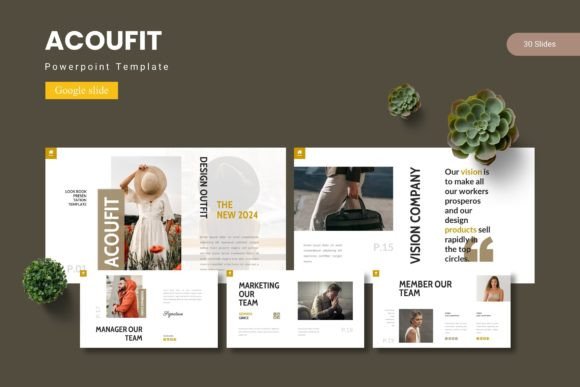
Acoufit: Your Modern Google Slide Template for Impactful Presentations
In a world saturated with visual communication, a standout presentation can be the difference between a forgotten idea and a memorable one. Enter the Acoufit - Google Slide Template, a comprehensive design asset crafted to elevate your slideshows from mundane to magnificent. This isn't just a collection of slides; it's a toolkit for creating professional, visually cohesive narratives that captivate your audience from the first click.
What is Acoufit and Who is it For?
Acoufit is a premium Google Slides template package designed for anyone who values polished, modern typography and clean design. It’s perfect for business professionals pitching to clients, educators crafting engaging lessons, marketers building brand decks, or designers presenting a portfolio. If you’ve ever struggled with aligning elements, choosing a color palette, or making data look interesting, this template solves those problems with its structured, master-slide-based framework.
Key Features That Foster Creative Flexibility
The true value of a great design asset lies in its flexibility and quality. Acoufit delivers on both fronts with a robust feature set:
- Massive Slide Library: With over 150 total slides across 5 premade color schemes, you have a vast library of layouts to choose from, ensuring you never run out of ideas.
- Pixel-Perfect & Editable: Every illustration and infographic is handcrafted for clarity and can be resized or edited to match your brand's exact needs.
- Seamless Workflow: Drag-and-drop picture placeholders and section break slides streamline the creation process, letting you focus on content, not formatting.
- Professional Polish: Features like gallery and portfolio slides are meticulously designed to showcase work in the most flattering light, enhancing your professional presentation.
Practical Applications: Beyond the Boardroom
While ideal for corporate presentations, the versatile design language of Acoufit lends itself to numerous creative projects. Consider using it to develop:
- Brand Identity Decks: Present logo concepts, color palettes, and brand guidelines with consistent, modern typography that reinforces the brand's voice.
- Marketing & Social Media Plans: Outline campaign strategies and social media content calendars in a visually engaging format that stakeholders can easily digest.
- Product Launches & Packaging Design Overviews: Use the clean layouts to tell the story of a new product, from initial concept to final packaging mockups.
- Educational & Instructional Material: Create clear, infographic-rich slides for workshops, webinars, or online courses that improve learning retention.
Tips for Choosing and Using Your Template
When integrating a template like Acoufit into your workflow, a few best practices can maximize its impact. Always preview the color schemes to see which aligns best with your project's mood—whether it's energetic, trustworthy, or elegant. Take advantage of the master slides to ensure global consistency in fonts and colors. Don't hesitate to mix and match slides from different color variations within the same deck for dynamic emphasis, but maintain a cohesive visual thread. Finally, remember that the template is a foundation; inject your unique content and personality to make it truly yours.
The right presentation template does more than organize information; it builds trust, enhances clarity, and reflects a commitment to quality. The Acoufit - Google Slide Template provides that essential foundation, offering a blend of aesthetic appeal and practical functionality. By choosing a thoughtfully designed asset, you’re not just buying slides—you’re investing in a more polished and professional way to share your ideas with the world.