Streamline Your Parking App Design with This UI KIT
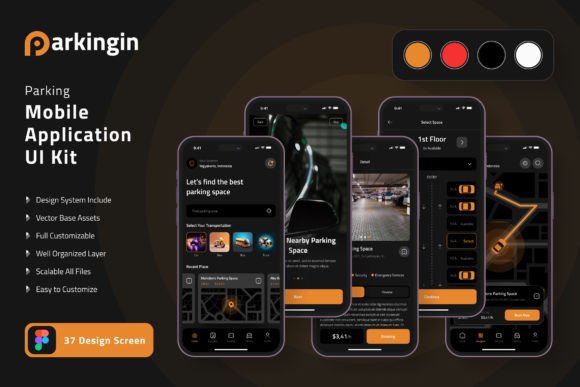
Designing a mobile application from scratch is a monumental task, especially when you're aiming for a polished, user-friendly experience. For developers and designers focused on creating a parking solution, the process often involves countless hours crafting individual screens, icons, and interactive elements. This is where a dedicated resource like the Parking App Mobile UI KIT becomes an invaluable asset, transforming a complex project into a streamlined and efficient workflow.
What is a Mobile UI KIT?
A UI KIT, or User Interface Kit, is a comprehensive collection of pre-designed components, screens, and assets that serve as a foundational blueprint for building a mobile application. Think of it as a professional designer's toolkit, packed with ready-made elements that ensure visual consistency and save significant development time. The Parking App Mobile UI KIT is a premium font and design asset bundle specifically tailored for this niche, offering a cohesive set of tools to bring your app concept to life.
Creative Value and Practical Applications
The true value of this design asset lies in its blend of aesthetic appeal and functional flexibility. It’s not just about having 20 pixel-perfect screen designs; it’s about having a cohesive system that can adapt to your specific brand identity. Whether you're a startup founder prototyping your first MVP, a freelance designer working on a client project, or a developer seeking to accelerate the UI/UX phase, this kit provides a professional springboard.
Consider its use in these scenarios:
- Rapid Prototyping: Quickly assemble interactive mockups to test user flows for finding, reserving, and paying for parking.
- Brand Consistency: Use the fully layered, scalable vector files in Adobe Photoshop or Sketch to apply your brand's color style and typography across every screen, ensuring a unified look and feel.
- Client Presentations: Present a high-fidelity, realistic representation of the final app to stakeholders, making abstract ideas tangible and compelling.
- Component Library: Extract the 80++ UI elements—buttons, input fields, maps, calendars—to use as a reusable component library for future projects, enhancing your overall design assets.
Design Flexibility and Customization
A standout feature of this kit is its commitment to flexibility. Every element is 100% vector-based, meaning you can scale any icon or interface component to any size without losing clarity—crucial for supporting various device resolutions. The inclusion of symbol objects in compatible design software like Adobe XD or Sketch allows for effortless global updates; change a button style once, and it updates across all screens where it's used.
Furthermore, the kit includes free fonts and icon vectors, which are essential for creating a modern typography hierarchy and clear, intuitive signage within the app. This focus on editable, layered files empowers you to move beyond a generic template. You can subtract elements for a minimalist parking meter app or add complexity for a full-featured urban mobility platform. The ability to easily change the color style means the entire kit can be adapted to match any brand palette, from corporate blues to vibrant, energetic hues.
Choosing the Right Design Asset
When selecting a UI kit or any design asset, it's wise to evaluate it against your project's specific needs. Here are a few actionable tips:
- Check the File Formats: Ensure the kit includes files compatible with your primary design software (e.g., Adobe Photoshop, Sketch, Adobe XD) to avoid workflow interruptions.
- Assess Scalability: Vector-based assets, as offered in this kit, are non-negotiable for professional work. They guarantee crisp results on high-DPI screens and allow for flexible resizing.
- Review the Component Depth: A good kit offers more than just screens. Look for a rich library of individual UI elements (icons, buttons, forms) that you can mix and match.
- Consider the License: Always verify that the license permits your intended use, whether for a single personal project or multiple commercial products.
Investing in a well-structured resource like this parking application kit is an investment in efficiency and quality. It provides the foundational visual consistency and professional polish that can elevate a functional app into a delightful user experience, helping you build with confidence from the very first screen.