Turosa - Google Slide Template
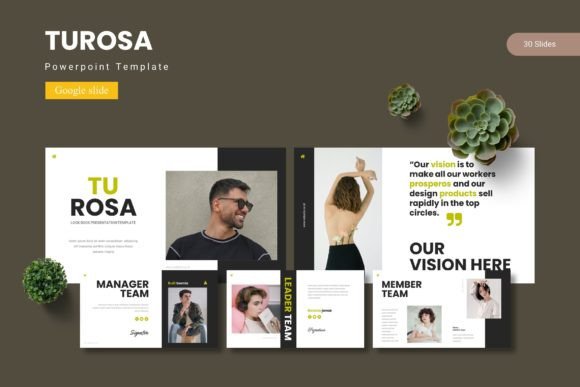
Create a presentation that truly captures your audience's attention with the Turosa - Google Slide Template. This versatile collection is designed for professionals and creatives who need to transform complex ideas into clear, visually compelling stories. With its clean layouts and modern aesthetic, Turosa provides a polished foundation for any project, from corporate pitches to educational workshops, ensuring your message is communicated with style and impact.
A Foundation for Professional Storytelling
Turosa is more than just a set of slides; it's a comprehensive toolkit built on the principles of effective modern typography and design. The template includes over 150 total slides across five premade color schemes, giving you immediate creative flexibility. Each slide is crafted with pixel-perfect illustrations and graphics that are fully resizable and editable, allowing you to maintain a cohesive brand identity throughout your presentation. The master slide system ensures consistency, saving you valuable time during the design process.
Practical Features for Efficient Design
The true value of a design asset lies in its practical application. Turosa excels here with features that streamline your workflow and enhance your output. The inclusion of handcrafted infographic elements makes data visualization straightforward and engaging, while the picture placeholder functionality allows for effortless drag-and-drop integration of your own images. Whether you're building a portfolio, a gallery, or a detailed project report, the structured section breaks and dedicated slide types help organize your content logically and beautifully.
Key advantages for your projects include:
- Visual Consistency: The five color variations and master slides help maintain a uniform look, which is crucial for brand recognition and professional polish.
- Time Efficiency: Pre-designed layouts for infographics, portfolios, and sections reduce the time needed to build a presentation from scratch.
- Design Flexibility: All graphic elements are editable, allowing you to adjust colors, sizes, and compositions to match your specific creative vision.
Ideal Use Cases and Creative Applications
Considering where a template like Turosa fits best? Its clean, modern design makes it exceptionally adaptable. It's perfect for creating impactful startup pitch decks, detailed business reports, and educational course materials. Marketing teams will find it invaluable for crafting social media campaign presentations or product launch announcements. The template's professional aesthetic also lends itself well to portfolio showcases for designers, photographers, and architects, helping their work stand out with a refined backdrop.
Tips for Selecting and Using Your Template
When choosing a template, think about your project's core mood and audience. Turosa's balanced style works well for both corporate and creative contexts, but always test a few slides to ensure the layouts align with your content flow. Pay attention to readability—ensure your text stands out clearly against the backgrounds. A pro tip is to use the provided font information in the readme file to pair Turosa's style with complementary typefaces for your body text, enhancing overall harmony. Finally, always verify the licensing to ensure it covers your intended use, whether for personal, commercial, or client-based projects.
Ultimately, the right template acts as a silent partner in your communication strategy. It elevates your content, reinforces your professionalism, and makes your ideas more memorable. The Turosa - Google Slide Template offers a robust and elegant solution that empowers you to present with confidence and clarity, turning every slide into an opportunity to impress.